

CollMap Field (app)
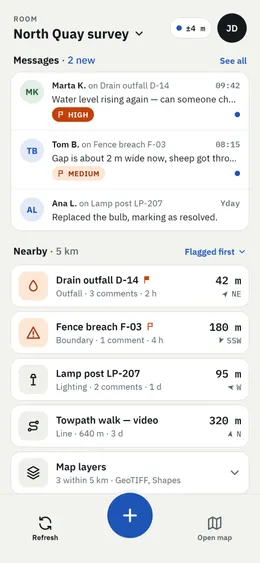
CollMap Field is a lean Android app that takes a CollMap room into the field. It shows what is around you, lets you report and answer on the spot, and keeps working without a connection: every change is queued on the phone and sent as soon as the network is back.
What you can do
Section titled “What you can do”- Messages — read and answer the room’s comments, with their priority flags; get notified of new ones.
- Nearby — assets around you sorted by distance, with a direction arrow; flagged ones first.
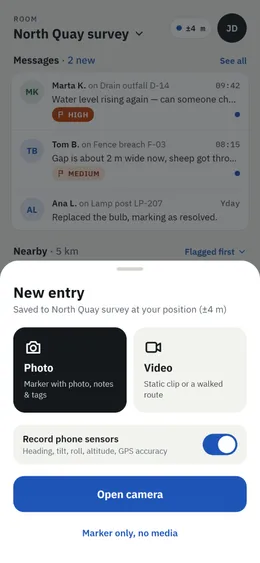
- Photo markers — take a photo, add notes and tags, and it lands on the map at your position. Heading, tilt, altitude and GPS accuracy can be saved with it.
- Video — record a static clip, or a walked route that is saved as a line with its track.
- Find me — an AR view that points you to an asset.
- On-device AI detection — object detection runs on the phone; you can load your own
.tflitemodel in Profile → Advanced.
Connect a room
Section titled “Connect a room”-
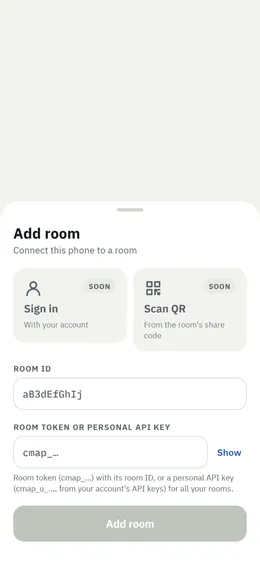
Open the app and tap Add room.
-
Either enter the room ID and a room API token (
cmap_…) for one room, or leave the room ID empty and paste a personal API key (cmap_u_…) to load every room of your account, view-only rooms included. -
Switch rooms from the room name at the top of the home screen.